Morals Integrity Discipline Listen
Contexto
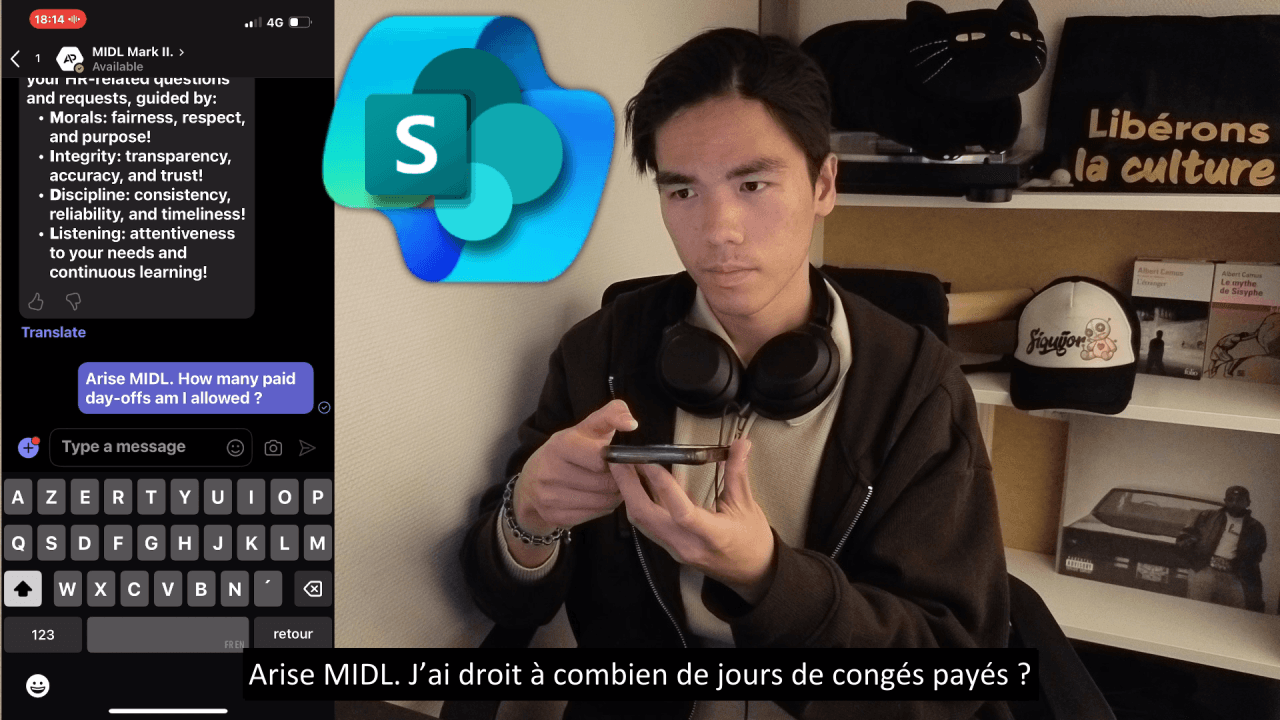
« Arise MIDL. How many paid day-offs am I allowed? »
« How many days am I allowed to work from home? »
No soy profesor, estas son mis propias notas, las de un estudiante insignificante, Aaron (Iso) Pescasio.
Para aprender sobre SharePoint y sus listas customs, decidí crear un Agente de IA que me proporcione las políticas de la Compañía del usuario actual.
Para quienes prefieren ver un video real que cubre todo paso a paso.
Insignificant Student
Como estudiante, mi objetivo es ganar dinero sin gastar nada.
Así que aproveché la prueba de 30 días de Microsoft 365 Business Premium y la prueba de 30 días de Copilot Studio.
Ya sea probando un tenant de Azure, Intune o M365 Copilot AI, me las arreglo con el tiempo que tengo.
M.I.D.L AI Agent Copilot Studio
Para crear el Agente de IA, voy a copilotstudio.microsoft.com; allí es donde puedes gestionar tus agentes de IA.
En este video, crearé una IA para el departamento de RR.HH., a la que llamaré MIDL.
Name: MIDL Mark II.

Description: Purpose of MIDL (Morals Integrity Discipline Listen) is to assist with recurring tasks in a semi-automated way—always with a human in the loop.

This will never be about replacing people or automating every step from A to Z. It's about empowering individuals to work more efficiently, while preserving the essence of human judgment, creativity, and care.

I believe in coexistence with AI, not domination by it. Just as we learn from different cultures, we can grow alongside intelligent systems.

AI can help us grow—not replace what makes us human.
La IA utilizará una lista custom en SharePoint para obtener, por ejemplo, las políticas de la Compañía sobre días de permiso pagado.
M.I.D.L SharePoint Site's Custom Lists
Para poder usar PowerShell con SharePoint, instalé la versión 7 de PowerShell.
winget install -e --id Microsoft.PowerShell

if (-not (Get-Module -ListAvailable -Name PnP.PowerShell)) {
    Install-Module PnP.PowerShell -Scope CurrentUser -Force -AllowClobber
}
En mi tenant de laboratorio recién creado, registré una aplicación PnP en Azure para poder ejecutar comandos PowerShell y conectarme a SharePoint Online.
### To connect to SharePoint Online, you need to register an application in Azure AD and give it the required permissions ###

Register-PnPEntraIDApp -ApplicationName "PnP PowerShell" -Tenant LabOfApes.onmicrosoft.com

### Connect to SharePoint Online ###

Connect-PnPOnline -Url "https://labofapes-admin.sharepoint.com" -ClientId "fill_with_clientid_of_application" -Interactive
Después de conectar, ahora puedo crear el sitio de SharePoint => Conectar al sitio recién creado => Crear la lista custom dentro del sitio => Rellenar la lista con valores.
### Create the SharePoint Site ###

New-PnPTenantSite -Title "MIDL" `
                  -Url "https://labofapes.sharepoint.com/sites/MIDL" `
                  -Template "STS#3" `
                  -Owner "fool@apescasio.fr" `
                  -TimeZone 4 `
                  -Lcid 1033

### Connect to the SharePoint Site ###

Connect-PnPOnline -Url "https://labofapes.sharepoint.com/sites/MIDL" -ClientId "fill_with_clientid_of_application" -Interactive

### Create the custom list in the site ###

New-PnPList -Title "company-policies" -Template GenericList

### Fill the list up with columns and values ###

Add-PnPField -List "company-policies" -DisplayName "Country" -InternalName "Country" -Type Text -AddToDefaultView
Add-PnPField -List "company-policies" -DisplayName "Company" -InternalName "Company" -Type Text -AddToDefaultView
Add-PnPField -List "company-policies" -DisplayName "PolicyType" -InternalName "PolicyType" -Type Choice -Choices "PaidDayOff","RemoteWork" -AddToDefaultView
Add-PnPField -List "company-policies" -DisplayName "Explanation" -InternalName "Explanation" -Type Note -AddToDefaultView

### FR LabOfApes - Paid Leave ###

Add-PnPListItem -List "company-policies" -Values @{
    Title = "FR-LabOfApes-PaidDayOff";
    Country = "France";
    Company = "LabOfApes";
    PolicyType = "PaidDayOff";
    Explanation = "Employees are entitled to 4 paid leave days per month of effective work with the same employer."
}

### FR LabOfApes - Remote Work ###

Add-PnPListItem -List "company-policies" -Values @{
    Title = "FR-LabOfApes-RemoteWork";
    Country = "France";
    Company = "LabOfApes";
    PolicyType = "RemoteWork";
    Explanation = "Employees are entitled to 3 days of remote work per week."
}

### US LabOfApes - Paid Leave ###

Add-PnPListItem -List "company-policies" -Values @{
    Title = "US-LabOfApes-PaidDayOff";
    Country = "United States";
    Company = "LabOfApes";
    PolicyType = "PaidDayOff";
    Explanation = "Employees are entitled to 2 paid leave days per month of effective work with the same employer."
}

### US LabOfApes - Remote Work ###

Add-PnPListItem -List "company-policies" -Values @{
    Title = "US-LabOfApes-RemoteWork";
    Country = "United States";
    Company = "LabOfApes";
    PolicyType = "RemoteWork";
    Explanation = "Employees are entitled to 1 day of remote work per week."
}
Topics AI Agent
Todos los Agentes de IA tienen lo que llamamos tópicos y, esencialmente, son flujos de trabajo.
Por ejemplo, puedes crear un tópico que envíe un correo a alguien si envías un mensaje específico a la IA.
Para mi IA, terminé creando 5 tópicos en total por ahora.
Topic 1 End Conversation
Creé este tópico para que, si envías el mensaje: « exit » o « quit » => la IA termine la conversación.
### © Aaron (Iso) Pescasio / www.apescasio.fr ###

kind: AdaptiveDialog
beginDialog:
  kind: OnRecognizedIntent
  id: main
  intent:
    triggerQueries:
      - exit
      - quit
      - stop
      - end conversation

  actions:
    - kind: SendActivity
      id: sendActivity_zbuT5w
      activity: Quitted conversation.

    - kind: EndConversation
      id: 38Aaio

inputType: {}
outputType: {}
Topic 2 Global Variables
Este tópico sirve para almacenar los valores de « Global Variables » como el País del usuario actual, el nombre de la Compañía y demás.
Puse una cuenta para que la IA la use para la autenticación; esto obviamente no es una buena práctica.
En el siguiente ciclo, intentaré hacer que la IA use una cuenta de servicio en su lugar.
### © Aaron (Iso) Pescasio / www.apescasio.fr ###

kind: AdaptiveDialog
beginDialog:
  kind: OnRecognizedIntent
  id: main
  intent:
    triggerQueries:
      - Arise

  actions:
    - kind: SendActivity
      id: sendActivity_MIDL
      activity: |-
        Hello {System.User.DisplayName}, I'm {System.Bot.Name}, your partner in Morals, Integrity, Discipline, and Listen.

        Together, we create a workplace where people come first, and systems work smarter.

        I'm here to help you with your HR-related questions and requests, guided by:
        - **M**orals: fairness, respect, and purpose!
        - **I**ntegrity: transparency, accuracy, and trust!
        - **D**iscipline: consistency, reliability, and timeliness!
        - **L**istening: attentiveness to your needs and continuous learning!

inputType: {}
outputType: {}
Topic 3 Get PaidDayOffs
Este tópico es para obtener la explicación relativa a la política de permisos pagados desde la lista en SharePoint.
Uso las « Global Variables » y mi cuenta para la autenticación.
Así que si envías la frase desencadenante a la IA, este tópico específico se activará.
En el filtro, hago uso del País del usuario actual, el nombre de la Compañía y PolicyType.
### © Aaron (Iso) Pescasio / www.apescasio.fr ###

### Filter => "Country eq '" & Global.UserProfile_V2.country & "' and Company eq '" & Global.UserProfile_V2.companyName & "' and PolicyType eq 'PaidDayOff'" ###

kind: AdaptiveDialog
beginDialog:
  kind: OnRecognizedIntent
  id: main
  intent:
    triggerQueries:
      - How many paid day-offs am I allowed ?

  actions:
    - kind: SendActivity
      id: sendActivity_OmGd7f
      activity: |-
        Referring to the HR's SharePoint for the organization's policies...
        - User's Country:
        {Global.UserProfile_V2.country}
        - User's Company:
        {Global.UserProfile_V2.companyName}
        - User's Department:  {Global.UserProfile_V2.department}
        - User's Email: {Global.UserProfile_V2.userPrincipalName}

    - kind: SetVariable
      id: setVariable_FwLzaa
      variable: Topic.explanation_only
      value: =First(Topic.GetItems.value).Explanation

    - kind: SendActivity
      id: sendActivity_FbLffN
      activity: |-
        Here's {Global.UserProfile_V2.companyName}' paid day-off policy for employees in {Global.UserProfile_V2.country}:
        - {Topic.explanation_only}

inputType: {}
outputType: {}
Topic 4 Get RemoteWork
El cuarto tópico es para obtener la explicación relativa a la política de trabajo remoto desde la lista en SharePoint.
### © Aaron (Iso) Pescasio / www.apescasio.fr ###

### Filter => "Country eq '" & Global.UserProfile_V2.country & "' and Company eq '" & Global.UserProfile_V2.companyName & "' and PolicyType eq 'RemoteWork'" ###

kind: AdaptiveDialog
beginDialog:
  kind: OnRecognizedIntent
  id: main
  intent:
    triggerQueries:
      - How many days am I allowed to work from home ?

  actions:
    - kind: SendActivity
      id: sendActivity_OmGd7f
      activity: |-
        Referring to the HR's Sharepoint for the organization's policies...
        - User's Country:
        {Global.UserProfile_V2.country}
        - User's Company:
        {Global.UserProfile_V2.companyName}
        - User's Department:  {Global.UserProfile_V2.department}
        - User's Email: {Global.UserProfile_V2.userPrincipalName}

    - kind: SetVariable
      id: setVariable_FwLzaa
      variable: Topic.explanation_only
      value: =First(Topic.GetItems.value).Explanation

    - kind: SendActivity
      id: sendActivity_FbLffN
      activity: |-
        Here’s {Global.UserProfile_V2.companyName}’ remote work policy for employees in {Global.UserProfile_V2.country}:
        - {Topic.explanation_only}

inputType: {}
outputType: {}
Topic 5 Conversation Start
El último tópico es simplemente presentar mi IA al inicio de cada conversación.
### © Aaron (Iso) Pescasio / www.apescasio.fr ###

kind: AdaptiveDialog
beginDialog:
  kind: OnConversationStart
  id: main
  actions:
    - kind: SendActivity
      id: sendActivity_pm8Kty
      activity: |-
        Hello {System.User.DisplayName}, I'm {System.Bot.Name}, your partner in Morals, Integrity, Discipline, and Listen.

        Together, we create a workplace where ethics meet efficiency, where people come first, and systems work smarter.

        I'm here to help you with your HR-related questions and requests, guided by:
        - **M**orals: fairness, respect, and purpose!
        - **I**ntegrity: transparency, accuracy, and trust!
        - **D**iscipline: consistency, reliability, and timeliness!
        - **L**istening: attentiveness to your needs and continuous learning!
M.I.D.L AI Agent Execution
Puedes chatear con el Agente de IA en Teams simplemente yendo a Channels => Teams y Microsoft 365 Copilot => y haciendo clic en See agent in Teams.
Puedes compartirlo con otros usuarios haciendo clic en Availability Options.
Después de enviar la frase desencadenante, la IA enviará el País, el nombre de la Compañía , el Departamento y el Correo electrónico del usuario actual.
La IA comprobará entonces los valores de la lista custom de mi Sitio de SharePoint.
Como hay una columna Country con el valor "France" y una columna Company con el valor "LabOfApes", la IA me devuelve el valor de la columna "Explanation".
Si quiero la política de otra Compañía , simplemente añadiré otra fila y la rellenaré con el nombre de la otra Compañía, Pais, y así sucesivamente.
Eso es todo.
Post M.I.D.L AI Agent Ramblings
No estoy satisfecho con la lista custom; puedo hacerlo mejor.
El mejor consejo que sigo una vez al mes es: romperlo todo y volver a reconstruirlo, una y otra vez.
Una vez al mes formateo mi PC y pongo todo de nuevo mediante PowerShell.
Una vez al mes destruyo mi lab tenant, y lo rehago todo, ya sea creando agentes Copilot o Autopilots Full Cloud de Intune.
Sigo aprendiendo en mi ciclo 7, y seguiré en el 8, 9 y así sucesivamente.
La repetición es simplemente la madre del aprendizaje.
Todo lo que mostré hasta ahora sigue siendo manual, pero encontraré algo durante el final de este ciclo o en el siguiente.
Si buscas empezar con TI o IA, echa un vistazo a algunas de mis notas => https://memo.apescasio.fr !
Para consultas profesionales, mi correo es him@apescasio.fr !
Para consultas personales, puedes contactarme a través de Discord / Instagram / Twitter, @himapescasio.
Última actualización: